
Presets
With Draftlist Pro, the presets your projects use, ranked and tagged, and your most used Serum presets copied into one folder in Serum.
Pro Presets is part of Draftlist Pro. Without Pro, the tab shows how many presets your projects use.
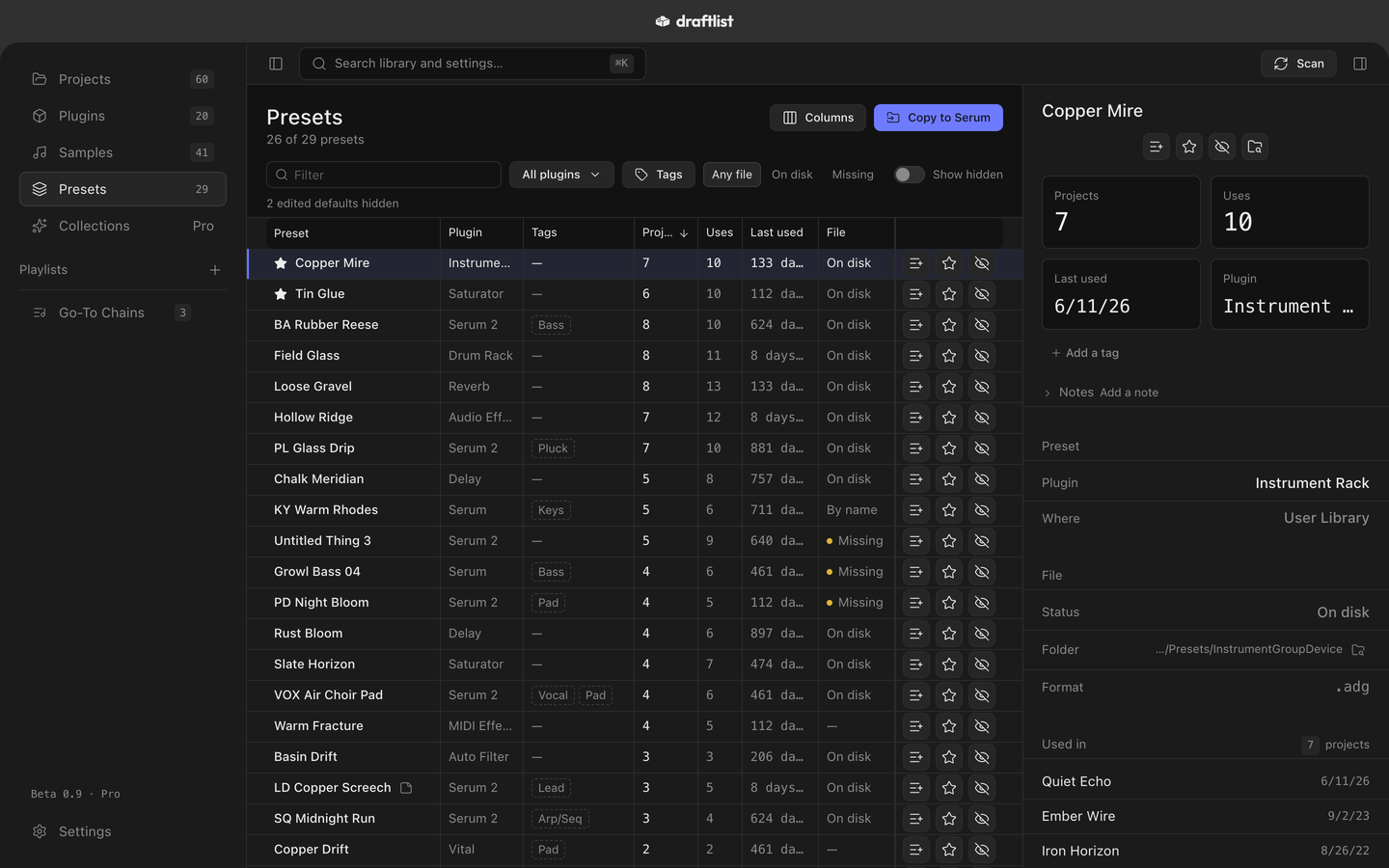
Presets lists every preset your projects use, ranked by how often you use it, the same way as Samples.
Which presets Draftlist reads
| Plugin | What Draftlist does |
|---|---|
| Serum 2 | Lists and tags them, and copies them into Serum |
| Serum | Lists and tags them, and copies them into Serum |
| Kontakt 5 to 8 | Lists the instruments your sets load |
| Vital | Lists them, with Vital's style tags |
| Omnisphere | Lists them, with their moods and keywords |
| Live's devices and racks | Lists the presets you saved |
Draftlist also lists presets from LABS, Splice INSTRUMENT and a few others. Kontakt instruments from locked commercial libraries aren't listed.
The list
Each row shows the Preset, its Plugin, its Tags, the Projects that use it, its Uses and when it was Last used. File shows whether the preset file is On disk, matched By name, or Missing.
- Filter by Plugin, by Tags (All or Any), or by File.
- Live devices whose settings you changed without saving a preset are grouped as Edited defaults, hidden at first.
Tags
Draftlist tags each preset from Serum's own categories, or from its name: a name starting "BS" is Bass, "LD" is Lead. Your own tags always win.
Copy to Serum
Copy to Serum puts your most used Serum presets in one place inside Serum, ready to browse.
- Press Copy to Serum.
- Choose How many: 25, 50, 100 or All, most used first.
- Leave Sort into folders by tag on to get Bass, Lead, Pad and so on as folders in Serum's list.
- Leave Keep it up to date on to refresh the copies after each scan.
- Press Copy (it says how many presets it will copy), then in Serum 2's preset menu choose Rescan Database. On Serum 1, choose Rescan Folders on Disk.
The copies go in a folder named Draftlist inside Serum 2's presets. Serum 1 presets go there too, since Serum 2 opens them. On a Mac with only Serum 1, the Draftlist folder is in Serum 1's presets, without tag folders.
Draftlist never writes into Serum's own Factory, Packs or User folders. It never overwrites a file. It copies the saved preset, not the changes you made to it in a set. Settings ▸ Folders ▸ Serum preset folders shows where the copies are.
Kontakt, Vital and Omnisphere presets are listed, not copied.
Last updated
Something wrong or missing on this page? Tell us.